We’ve publicly released the NowServing Baby Book on September 1, 2026, and received so interesting questions regarding the features. This guide answers them all. Let’s begin!
What is the NowServing Baby Book?
NowServing Baby Book is a digital baby record book that parents can access using the NowServing app. This baby book includes 3 trackers essential to see how healthy your baby is and if they are achieving all the crucial milestones per month.
The 3 trackers in the NowServing Baby Book:
- Growth (Weight & Height)
- Vaccines (List of baby vaccines & Dosage schedules)
- Milestones
Read this related article to understand more about the trackers available on the NowServing Baby Book.
Will there be a reminder for the upcoming vaccine for my baby?
Another common question that users ask us is getting a notification for the next vaccination. The answer is yes. We have an in-app banner that notifies the user for the upcoming vaccine schedule of their baby.
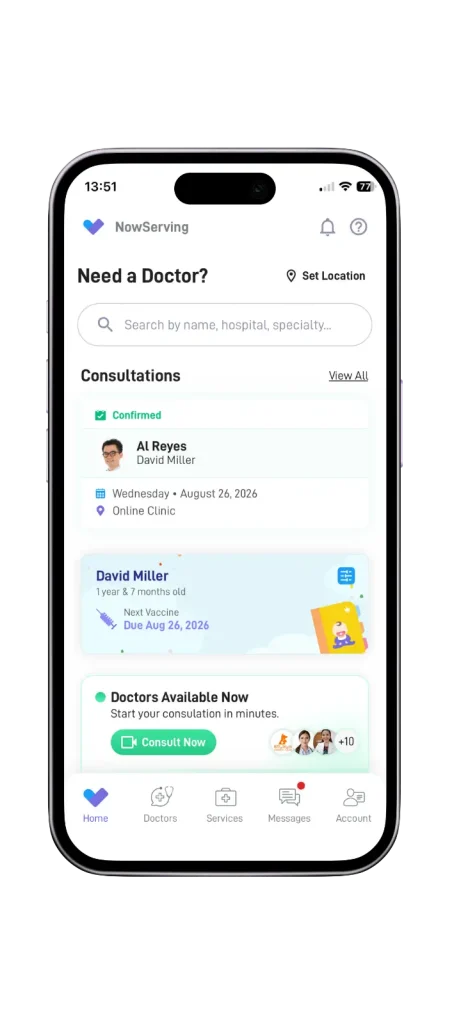
At the same time, other forms of notifications via email, sms, and app notifications include alerts for the next pediatric consultation where the baby can receive the vaccine they need.
For the full list of baby vaccine schedules, you can read this related article.
Can the Baby Book be exported to PDF?
One of the common questions from users of the NowServing Baby Book is the downloading of entries as PDF. While downloading to PDF is supported, you can only do so for the vaccine tracker entries. Growth trackers’ entries are downloadable to PNG File, while you can’t download the milestone trackers entries.
Most parents ask this question to convert this online baby book to a physical baby book. If that’s the plan, we recommend you to have a separate paper book instead of downloading and printing the entries from the NowServing Baby Book.
Can I add photos and writings in the digital baby book?
Another question we got from our users is if they can add photos and writings to personalize their baby’s baby book. Unfortunately, it is not supported in the NowServing Baby Book yet. At the same time, users can’t customize the design of the baby book based on their preferences.
If you have thoughts or other narratives you want to include to make every milestone achieved more memorably, we suggest using your paper baby book for now.
Is it possible to edit the doctor’s entry or if the doctor can edit my entries?
On the other hand, this question from users is important to address too, and the answer is no. Parents cannot edit the pediatrician’s entry, and vice versa. That’s the design intended to maintain accuracy and legit findings from the doctor.
Furthermore, to prevent confusion on the entries, the design intended in all trackers include a small bubble with the doctor’s photo. Thus, allowing you to easily identify whether or not that update is from you or the doctor.
Is it possible to track growth and milestones for premature babies?
Preterm birth is possible, especially if the parents have chronic conditions, vaginal bleeding, and other factors that led to early childbirth. Unfortunately, parents cannot use the NowServing Baby Book to track growth and milestones for preterm cases.
Make sure to consult with your baby’s pediatrician on how to properly assess your child’s development.
Can a medical doctor in the barangay health center update my NowServing Baby Book?
Other cases may happen wherein a parent visits a local health center for free immunizations for their baby. In that case, you cannot let that health expert access your baby’s baby book. What you can do instead is to inform your NowServing pediatrician about this outside session.
You can also update the baby book on your end. If the session involved vaccination, just update which type of vaccine and the date your baby received the immunization.
Can I access the baby book offline?
While you can open the baby book on your device without an internet connection, it doesn’t mean that you can access the full health data of your baby. At the same time, you cannot edit and save a new entry on the baby book if you update anything offline. It’s best to make sure that your internet connection is stable before opening and updating the NowServing Baby Book.
Learn how you can open your child’s baby book with this guide.
Ready to Use the NowServing Baby Book?
We’ve covered all of the commonly asked questions from our users. If you have any questions we haven’t tackled yet, feel free to send your feedback to us.
Don’t have the baby book yet? Download the NowServing app and consult with a pediatrician to unlock the NowServing Baby Book today!