
NowServing Baby Book · Free

NowServing Baby Book: your digital baby health record

Keep your paper baby book. This is the copy that lives in your phone, counts the dates for you, and shows you which vaccines are already overdue.

Pediatricians in clinics across the country, bookable in the app.

Free to use Flags overdue vaccines Your pedia adds to it too
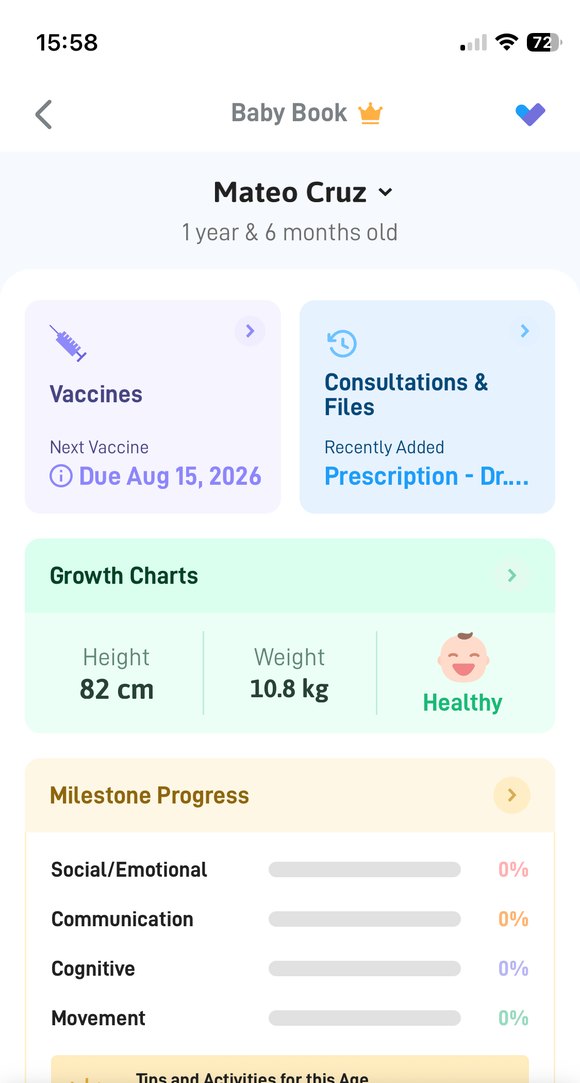
The NowServing Baby Book screen for a child aged one year and six months: the next vaccine due date, the consultations and files card, the growth chart summary with height, weight and a Healthy label, and the milestone progress bars.

A paper baby book cannot tell you a vaccine is late.

Neither can memory, on the morning of a check-up, with a toddler on your hip. The NowServing Baby Book counts the dates from your child's birthday and shows you what is due and what has been missed.

What it is

What is the NowServing Baby Book?

It is the digital baby book inside the NowServing app. Part tracker, part memory book: it holds your child's vaccine schedule, growth chart and milestones, from birth to 18 years old. You add entries, and so does the pediatrician you booked.

Vaccine schedule Hib Dose 4 · Taken MMR Dose 2 · Overdue HepA Dose 2 · Due Jul 15

Baby vaccine chart

Every vaccine on the Philippine schedule, with the doses and due dates counted from your child's birth date. Many of them fall before the first birthday, which is exactly when the days blur together.

Mark one as given and it clears. Anything past its date is flagged. You can export the list and send it to your doctor from inside the app.

The exported list carries vaccine names and dates only, without the lot numbers and signatures a clinic records, so keep your paper baby book for anything that needs a signed record.

Baby growth chart

Enter your child's height in centimeters and weight in kilograms and the chart plots it on a growth curve. You get the percentile and a plain label beside it, like "Healthy height."

Your pediatrician's measurements plot on the same chart as yours, so a check-up and a Sunday morning weigh-in sit on one line. Theirs carry their photo, so the two never get confused.

These labels are tracking guides, not a diagnosis. Anything that worries you goes to your pediatrician.

Growth chart Age (months) 82 cm 50th percentile Healthy height
Milestones 18 MONTHS SOCIAL / EMOTIONAL Points to show you something Puts hands out to be washed COMMUNICATION Tries 3 words besides mama Follows a one-step direction COGNITIVE Copies you sweeping

Milestones

Tick off the firsts as they happen, from the first smile onward. The checklist follows the milestones used at well-child visits and runs from 2 months through 5 years, grouped into social and emotional, communication, cognitive, and movement.

Children reach these at different ages. The list is there to help you notice and remember, not to grade anyone.

If something on the list worries you, raise it with your pediatrician. For development questions specifically, a developmental and behavioral pediatrician is the specialist to ask.

Also in there

The three trackers are the reason people open it. These are the reasons they keep it.

Next vaccine, on the home screen

The due date sits on your child's card, so you see it without opening anything.

Tips and activities for this age

Age-appropriate things to try with your child, refreshed as they grow.

Prescriptions and files

Anything your doctor sends you lands in the same place as the records.

One account, every child

Add each of your children and switch between them. Each one gets their own Baby Book.

Getting started

How it works, in three steps

A few minutes in the NowServing app, and it stays with you from then on.

1

Log in with your mobile number

Open the NowServing app and sign in with your own mobile number. That is all the setting up you need to do. Your child's profile comes in the next step.

2

Book their pediatrician

Choose a pediatrician on NowServing and book an appointment. Already their patient? Your pedia can send you a link from their side instead, with no booking needed.

3

Open the Baby Book

Once the doctor accepts the booking, or you open the link they sent, your child's profile is linked to your account and their Baby Book appears on the home screen automatically, set up for their age.

Your pedia is not on NowServing yet?

Booking a pediatric consultation on NowServing is the usual way to open the Baby Book for your child. If your usual pedia is not on the app, browse the pediatrics directory and find one near you. Pediatric subspecialties are in there too, including developmental and behavioral pediatrics.

Browse pediatricians
FAQs

Frequently asked questions

Where do I find the Baby Book in the NowServing app?+

It appears on the home screen of the app once a pediatrician on NowServing has linked your child's profile, either by accepting your booking or by sending you their link. Tap your child's name to open their vaccines, growth chart and milestones.

Why can't I see the Baby Book on my account?+

Run through these in order. Is your child added as a profile under your account? Is that profile 18 or younger? Has a pediatrician on NowServing accepted a booking for them, or sent you a link to connect your child's records? The Baby Book is created automatically once one of those two happens, so if the booking is still waiting on the doctor, it will not be there yet.

If all three are true and you still cannot see it, message us from inside the app with your child's profile name and we will look at your account.

Is the Baby Book free?+

Yes. The NowServing Baby Book is free. Consultations are charged separately.

Can I track more than one child?+

Yes. Add each of your children and switch between them from the same account. Each child gets their own Baby Book.

If your child has seen more than one pediatrician on NowServing, you may see a separate profile for each. They are separate records, so check you are in the right one before you add an entry.

Can the NowServing Baby Book replace a paper baby book?+

No, and it is not meant to. Keep your paper baby book. What you export from the app carries vaccine names and dates only, without the lot numbers and signatures a clinic records, so anything that asks for a signed record still needs the paper one.

Think of it as the copy you always have with you, and the one that tells you what is due.

Up to what age can I use the Baby Book?+

The Baby Book covers children from 0 to 18 years old.

Can I use the Baby Book if my child was born premature?+

You can use it, but the growth chart makes no adjustment for premature birth today. If your baby came early, go by what your pediatrician says rather than the chart's label.

Do I have to wait for my doctor to fill it in?+

No. An empty Baby Book still works. You can tick off vaccines your child has already had, add your own height and weight measurements, and check off milestones yourself. Your pediatrician's entries appear alongside yours when they record them.

Guides

Read next

The schedules, the costs and the questions parents ask us most.

You cannot forget the one that is already in your pocket.

Book your child's pediatrician on NowServing and their Baby Book opens with vaccines, growth and milestones ready to fill.

Free to use. Keep your paper baby book too.

Book a Pediatrician